Advanced Typography | Task 1: Typographic Systems & Type and Play
22/04/2024 - 13/5/2024 | Week 1 - 4
Iman Mikudim | 0338004 | Section 3
Advanced Typography | Bachelor of Design (Hons) in Creative Media
Task 1: Exercise 1 (Typographic Systems) & Exercise 2 (Type and
Play)
SECTIONS
- Lecture 1: Typographic Systems
- Lecture 2: Typographic Composition
- Lecture 3 : Context & Creativity
- Lecture 4: Designing Type
- Lecture 5: Perception & Organisation
- Exercise 1: Typographic Systems
- Exercise 2: Type and Play
| Feedback
LECTURES
Lecture 1 | Typographic Systems
"Typographic systems provide a sense of purpose that focuses and directs the decision-making. Shape grammar is a set of shape rules that apply in a step-by-step way to generate a set, or language, of designs."

Fig 1.1
Typographic
Systems
All design is based on a structural system. There are eight major variations according to Elam which are:
- Axial: all elements are organized to the left or right of a single axis.
-
Radial: all elements are
extended from a point of
focus.
- Dilatational: all elements expand from a certain point in a circular fashion.
-
Random: elements appear to
have no specific pattern
or relationship.
-
Grid: a system of
vertical and horizontal
divisions.
- Modular: a series of non-objective elements that are constructed in as standardised units.
- Transitional: an informal system of layered banding (segregating information within specific bands).
-
Bilateral: all text is
arranged symmetrically
on a single axis.
Lecture 2 | Typographic Composition
There are two (2)
aspects of
typography:
-
Typography
pertains
to the
creation
of
letters.
-
Typography
pertains
to
the
arrangement
of
large
amounts
of
text
within
a
given
space
(Typographic
Composition),
which
can
be
screen,
print,
tactile,
on a
building,
or
any
other
space.
There are several ways to
approach typographical
composition:

Fig 2.1 Emphasis in Typographic Composition
Principles of Design
Composition: Emphasis,
isolation, repetition,
symmetry, asymmetry,
alignment, and perspective
are just a few examples.
However, when used in
typographic layouts or
compositions, these
principles can appear
ambiguous and more
relevant to imagery.
Emphasis, symmetry, and
asymmetry are easily
translated into
typographic composition,
whereas repetition and
perspective are harder to
achieve.

Fig 2.2 Rule of Thirds in Typographic Composition
Rule of Thirds: A photographic
composition guide that
suggests dividing a frame
(space) into three columns
and three rows. The
intersecting lines are
used as a guide for
placing the points of
interest within the
available space. However,
it is rarely used in
typographic
compositions.
Typographic Systems

Fig 2.3 Grid System (or Raster Systeme)
The Grid System (also known as the
Raster Systeme) is the
most commonly used of the
eight typographic systems.
It was further enhanced by
what is now known as the
Swiss (Modernist)
typographic style. The
grid system is popular
because it
is versatile and modular,
allowing for an infinite
number of variations. Our
reading style favours
order and well-organized
compositions.

Fig 2.4 Paula Scher, Jonathan Barnbrook, David Carson
In the postmodernist era,
younger designers
experimented with
chaos,
randomness, and
asymmetry.
Designers relied heavily
on intuition and instinct,
and there was order to the
chaos. Asymmetry,
randomness, repetition,
dilational, and radial
systems began to emerge.
David Carson, Paula Scher,
and Jonathan Barnbrook
expertly combined
legibility and
readability.
Other Models / Systems

Fig 2.5 Environmental Grid
Environmental
Grids: Based on the exploration
of an existing structure /
combination of structures.
An extraction of critical
lines, both curved and
straight, is created. The
designer arranges the data
around this
superstructure, which
contains non-objective
elements, to create a
distinct combination of
texture and visual
stimuli. The system is
built around key features
of an environment that
provide context for the
forms created in the
design.

Fig 2.6 Form and Movement
Form and Movement: Based on the exploration of an existing Grid System, it encourages students to explore the opportunities of the grid and eliminate the seriousness surrounding the system. The placement of a form on a page, over many pages, creates movement. The forms could represent images, text, or colour.
"There is a fine line between genius and insanity, just as there is a fine line between legibility, redability and memorability." (1st line, Oscar from Levant; 2nd line, Mr. Vinod).
Lecture 3 | Context & Creativity
Handwriting

Studying handwriting is important because the first mechanically produced letterforms were designed to directly imitate handwriting. Handwriting is the standard basis for form, spacing and conventions of mechanical type that we try and mimic.
Letterforms shape and line are influenced by the tools and materials used to make them. Some tools that contributed to the unique characteristics of the letterform are: Sharpened bones, Charcoal sticks, Plant stems, Brushes, Feathers and steel pens.
Another factor that
contributed to the unique
characteristics of the
letterform lies in the
material it was written on,
such as clay, papyrus, palm
leaf, animal skins (vellum
and parchment) and paper.

- Earliest system of actual writing, from 34C.B.C.E. through the 1st century C.E.
- Written from left to right.
- Distinctive wedge results from pressing the blunt end of a reed stylus into wet clay tablets.
-
Characters evolved
from pictograms.

- The Egyptian writing system.
- Fused with the art of relief carving.
- The system is a mixture of both rebus and phonetic characters.
- Hieroglyphics images could be used as ideograms, determinations and phonograms.
- Ideograms: To represent the things they actually depict.
- Determinatives: To show that the signs preceding are meant as phonograms.
-
Phonograms: To
represent sounds that
"spell out" individual
words.

- Phonetic alphabets consists of 22 letters.
- Phoenicians were adopted by the Greeks who added the necessary vowels.
- Early Greek comprises only capital letters, written between two guidelines in order to organize them in horizontal rows.
- The direction of reading is not yet fixed so it was read one row left to right and then switched from right to left in a format known as boustrophedon or 'as the ox ploughs'.
- Written freehand, not constructed with compasses and rules, no serifs.
- The strokes of these letters grew thicker, the aperture lessened, and serifs appeared.
-
Model for calligraphy in
the past 2000 years.

Fig 3.5 Roman Uncials
- Roman letters became more rounded.
-
The curved forms allow
for fewer strokes and
therefore could be
written faster.

- The uncials evolved into a more slanted and condensed form.
-
While English and
Irish uncials evolved,
the European continent
devolved considerably
and needed a reformer
and that is when
Carolingian
Handwriting Reform
came in.


- Capitals at the start of a sentence, spaces between words and punctuation.
- Used for all legal & literary works to unify communication between various regions of the European empire.
- This style became the pattern for the Humanistic writing of the fifteenth-century.
-
The basis of our
lower-case Roman
type.


- Gothic is an artistic expression, occurring roughly from 1200-1500 and originated with the Italians who referred to rude or barbaric cultures north of the Italian Alps.
- Characterized by tight spacing and condensed lettering.
- Evenly spaced verticals dominated the letterform.
-
Condensing line
spacing and letter
spacing reduced the
amount of costly
materials in book
production.


- Humanist scholars were reviving the culture of antiquity.
- Humanists named the newly rediscovered letterforms 'Antica'.
-
The Renaissance
analysis of form
that was being
applied to art and
architecture was
directed toward
letterforms,
resulting in a more
perfect or
rationalized
letter.

- Printing on wood blocks has already been practised in China, Korea and Japan.
- The earliest known printed book (AD 868) is Diamond Sutra, with the world’s first printed illustration.
- Koreans established a foundry to cast movable type in bronze, allowing the dismantling and resetting of text.
-
The movable type
was introduced in
1000-1100 CE.
Pioneered by China
but achieved in
Korea.

The evolution of Middle
Eastern Script itself
has been possibly
influenced by the
Egyptian Hieroglyphics
and Hieratic Scripts.
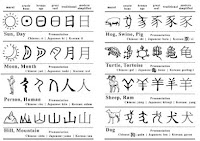
The evolution of Chinese
Script from the Oracle
Bone, to Seal Script, to
Clerical Script, Tradition
and Simplified Scripts.

- Oldest writing found in the India Continent, Indus Valley Civilization.
- It is undeciphered and is believed to have non- linguistic nature.
-
The script is
very decorative,
showing how
advanced the IVC
was.

- The earliest writing system developed in India after the Indus script.
- One of the most influential writing systems: All modern Indian scripts and many scripts found in Southeast and East Asia are derived from Brahmi script.
-
Derived or at least
influenced by one or
more contemporary
Semitic scripts due to
cross-cultural
exchange.

- Pallava (or Pallawa in Malay):
- A South Indian script originally used for writing Sanskrit and Tamil.
- Highly influential, became the basis for writing systems across Southeast Asia.
- Pra-nagari:
- Indian script used in the Malay Archipelago for writing Sanskrit.
- An early form of the Nagari script.
- Kawi:
- Indonesia's most important historical script.
- Based on Nagari, but indigenous to Java.
- Used for contacting other kingdoms.
- Became the basis of other scripts in both Indonesia and the Philippines.
- Incung:
- The original writing system from Kerinci.
- Comes from a South Sumatran grouping of scripts known as Rencong.
Programmers & Type Design

- More vernacular scripts are being produced by software giants (Google).
- More vernacular and ‘multi-script’ typefaces are being produced to cater to situations where written matter is communicated in vernacular script or vernacular and Latin script.
Lecture 4 | Designing Type
Why design a new typeface?
- Type design carries a social responsibility so one must continue to improve its legibility.
-
Type design is a form
of artistic
expression.


- Designed by the Swiss type designer Adrian Frutiger, who also designed Univers type.
- A sans serif typeface.
- Developed for the Charles De Gaulle International Airport in France.
- The letterform needed to be easily readable even when the reader was moving and is easy to see from both close up and far away.
-
Tested with unfocused
letters to see which
letterforms could
still be identified in
poor light conditions
or when the reader was
moving quickly past
the sign.


- Many of Carter's fonts were created to address specific technical challenges.
- Commissioned by Microsoft to create a typeface designed for the screen.
- The font was extremely legible even at very small sizes on the screen.
-
Characteristics
derived from the pixel
rather than the pen,
the brush or the
chisel.

- Commissioned by AT&T which wanted a new typeface for use in their telephone directories and to solve problems related to the existing phonebook typeface, Bell Gothic.
-
Design ink traps to
prevent ink spread
when printing on
low-quality paper at
high speeds.


- Previously known as "Underground" typeface.
- Commissioned by London's Underground Railway to create a standardized font for their posters and signage.
-
Used the
proportions of
Roman capital
letters which had
a lot of history
in traditional
calligraphy, but
was also simple
enough to fit the
modern age.
General Process of Type Design
- Before creating a type, it is essential to understand type history, type anatomy and type conventions.
- Determine the type's purpose, what it would be used for, and what different applications it will be used in (such as for school buses or airport signage, etc.).
- Study existing fonts that are presently used for inspiration/context/usage patterns/ideas/etc.
- Sketching can be done with both traditional tool sets (brushes/pens, ink and paper) and then scanned for the purpose of digitization, or with digital tools such as Wacom, directly into a font design software.
- Both methods have their positives and negatives, just use whatever works for you.
- Using professional software such as Fontlab and Glyph Apps.
- Attention should not be given to the whole form at this stage but also the counter form - the readability of the typeface is heavily dependent on it.
- Testing is a part of the refining and correcting aspects of typeface.
- Prototyping is part of the process and leads to important feedback.
- Deploying a typeface does not mark the end of the revision.
-
Teething problems
may emerge after
the prototyping
and testing
phases.
Typeface Construction

Using grids (with
circular forms) can
make an easier
construction of
letterforms and is a
possible method to
build/create/design
the letterform.
Construction & Considerations


Many different forms
and constructions must
be taken into account
when creating a new
type. One of the
important visual
corrections is the
extrusion of curved
and protruding forms
past the baseline and
cap line (overshoot).
This also applies to
vertical alignment
between curved and
straight forms.

A visual correction is also needed for the distance between the letters. A consistent 'visual' white space between letters must be created because some letters next to each other may not look good with equal spacing. The white space between letters should look the same (fitting type).
Lecture 5 | Perception & Organisation
Perception
Perception in
typography deals with the
"visual navigation and
interpretation of the reader
through contrast, form and
organization of content".
The content can be textual,
visual, graphical or in the
form of colour.

There are several methods
in typography to create
contrast and the image
shown above is devised by
Rudi Ruegg. They are self
explanatory.

Carl Dair had 7 ways to create contrast - size, weight, contrast of form, contrast of structure, contrast of texture, contrast of colour and contrast of direction.
- Size: A contrast of size provides a point to which the reader’s attention is drawn. The most common use of size is in making a title or heading noticeably bigger than the body text.
- Weight: Describes how bold type can stand out in the middle of the lighter type of the same style. Using rules, spots, and squares also provides a “heavy area” for a powerful point of visual attraction or emphasis.
- Form: The distinction between a capital letter and its lowercase equivalent, or a Roman letter and its italic variant, condensed and expanded versions of the typeface are also included under the contrast of form.
- Structure: The different letterforms of different kinds of typefaces. For example, a monoline sans serif and a traditional serif, or an italic and a blackletter.
- Texture: By putting together the contrasts of size, weight, form, and structure, and applying them to a block of text on a page. Texture refers to the way the lines of type look as a whole up close and from a distance.
- Direction: The opposition between vertical and horizontal, and the angles in between.
-
Colour: The use
of colour suggests
that a second colour
is often less emphatic
in values than plain
black on white. It is
important to give
thought to which
element needs to be
emphasized and to pay
attention to the tonal
values of the colours
that are used.
Form


Fig 5.3 Examples of 'Form'
- Typography, derived from Greek words “typos” (form) and “graphis” (writing), involves writing in accordance with form.
- It serves two primary functions: representing a concept and doing so visually.
- Displaying type as a form showcases the unique characteristics and abstract presentation of letterforms.
-
Manipulating type
through distortion,
texture, enlargement,
and extrusion into
space transforms it
into a form, blurring
its identity as
individual letters and
creating a balanced
harmony between
function and
expression.
Organisation: Gestalt Laws (Principles)
Gestalt in German means the way things have been placed or put together. Gestalt theory emphasizes that the whole of anything is greater than its parts, this can be the same for designing layouts.

- Law of Similarity: Elements that are similar to each other tend to be perceived as a unified group (eg. grouping of colour, orientation, size, or indeed motion).
- Law of Proximity: Elements that are in close proximity to each other tend to be perceived as a unified group.
- Law of Closure: Refers to the mind’s tendency to see complete figures or forms even if a picture is incomplete or partially hidden by other objects.
- Law of Continuation: Refers to how humans tend to perceive each of two or more objects as a different, singular, and uninterrupted object even when they intersect.
- Law of Symmetry: Humans tend to perceive objects as symmetrical shapes, even if symmetry isn't explicit.
-
Law of Simplicity
(Praganz):
People prefer
simplicity and
clarity in visual
stimuli, organizing
complex scenes in
the simplest way
possible.
INSTRUCTIONS
Exercise 1 | Typographic
Systems
Sections:
1. Brief
2. Process
3. Final (Submission)
1. Brief
For this exercise, we are to
explore 8 systems which are Axial, Radial, Dilatational, Random, Grid, Modular, Transitional
and Bilateral
in InDesign using the content
provided in the MIB.
-
Size: 200 x 200 mm.
-
In addition to black,
allowed to use one other
colour.
-
Graphical elements (line,
dot, etc.) can be used but
limitedly.
We were also instructed to
watch the InDesign Formatting
and Modular System
demonstration videos in the
lecture playlist to help recap
and assist us with the tools
and layouts to use in our
designs.

 Fig 6.1
Formatting Tutorial
Fig 6.1
Formatting Tutorial

 Fig 6.2
Modular System Tutorial
Fig 6.2
Modular System Tutorial
2. Process
(i) Initial Layouts

 Fig 6.3
Creation Process (Grids
& Guides) |
Week 1
(22/4/24)
Fig 6.3
Creation Process (Grids
& Guides) |
Week 1
(22/4/24)
I prefer to work directly in the software when it comes to layout ideas, so I didn't create any sketches, which makes my thought process easier to see. Fig. 6.3 shows the creation process of 8 different systems. I mainly used sans serif typefaces as I felt it fit the theme for 'Punk' theme.
All body text sizes range from 10 to 12 points,
with the majority being 12 points with a 14.5
leading. Title point size varies. The accent
colour is magenta, along with black and white,
because these are popular punk colours.
(ii) Feedback
After receiving feedback from Mr. Vinod these were the comments he made for each system:
- Axial/Dilational/Transitional: Good, no comments.
- Random: It is about artistic expression, so I need to learn to use the sensibility of contrast and dominance more when placing information. It shouldn't just be lines of text scattered everywhere. There is chaos, but there is also some rhythm.
- Bilateral: Good but angles of axis should not be 45 degrees.
- Radial: There are too many different weights and types, which makes readability difficult. When experimenting with fonts and weights, make sure it's readable.
(iii) Revised Layouts


For axial, I reduced the angle of the axis and shifted
it to the right slightly. I also changed the placement
of "All Ripped" and right-aligned it with the word
"Up".


For modular, I've also redone my layout, using a 4 by 4
column and row structure and precisely placing each
piece of information in one unit, as opposed to the
previous design, which used two columns for headings.


For grid, I went ahead and reduced the weights of some
of the texts and lines because I felt they were too
strong. Finally, I've added a bar to the top right of
the page that highlights 'open public lectures' and
'lecture theatre 12'.


For radial, I went with a new simpler layout,
reducing font weights and adding a circle to draw
attention to the heading, as well as placing the
heading slightly to the left of the outer circle to
draw more attention to it.


3.
Final (Submission)
Final Typographic Systems Layouts (JPEG)
 Fig 6.10
Final Axial Layout
| Week 2 (1/5/24)
Fig 6.10
Final Axial Layout
| Week 2 (1/5/24)
 Fig 6.11 Final Bilateral Layout
| Week 2 (1/5/24)
Fig 6.11 Final Bilateral Layout
| Week 2 (1/5/24)
 Fig 6.12 Final Dilational Layout
| Week 2 (1/5/24)
Fig 6.12 Final Dilational Layout
| Week 2 (1/5/24)
 Fig 6.13 Final Grid Layout
| Week 2 (1/5/24)
Fig 6.13 Final Grid Layout
| Week 2 (1/5/24)
 Fig 6.14 Final Modular Layout | Week 2 (1/5/24)
 Fig 6.15 Final Radial Layout
| Week 2 (1/5/24)
Fig 6.15 Final Radial Layout
| Week 2 (1/5/24)
 Fig 6.16 Final Random Layout
| Week 2 (1/5/24)
Fig 6.16 Final Random Layout
| Week 2 (1/5/24)
 Fig 6.17 Final Transitional
Layout | Week 2 (1/5/24)
Fig 6.17 Final Transitional
Layout | Week 2 (1/5/24)
Final Typographic Systems Layouts (PDF) - Without
Guides
Final Typographic Systems Layouts (PDF) - With
Guides
Exercise 2 | Type &
Play
Sections:
1.
Brief
2. Type
3. Poster
1. Brief
-
This task requires us to
choose an image of a
man-made object or
structure, or something from
nature. Make sure the image has a
few elements.
-
Our task is to analyze,
dissect, and identify
letterforms in the image.
Explore and digitize the
forms. It is expected that
the forms will evolve from
crude representations to a
more refined celebration
that reflects its
origins.
-
After creating the
letterforms, we must combine
them with an image that
forms the extracted letters.
The goal is to improve
letterform-visual
interaction. Text and image
must work together.
2. Process (Type)
(i) Finding an image
 Fig 7.1
Chosen Image | Week 2 (2/5/24)
Fig 7.1
Chosen Image | Week 2 (2/5/24)
I chose my own shot of a
washing basket at home because
I thought the diagonal and
octagonal repeated patterns
were interesting.
(ii) Deconstruction of
letterforms

 Fig 7.2
Deconstructing
letterforms | Week 2 (2/5/24)
Fig 7.2
Deconstructing
letterforms | Week 2 (2/5/24)
After deconstruction, I
discovered and realized
that there were several
ways to angle the stems of
the letters.
After deconstruction, I
discovered and realized
that there were several
ways to angle the stems of
the letters.
(iii) Identifying letterforms
 Fig 7.3 Identification of
letterforms | Week 2
(2/5/24)
Fig 7.3 Identification of
letterforms | Week 2
(2/5/24)
I chose the four letters 'T',
'U', 'L', and 'C' mostly
because they are our
university's acronym, but also
because I felt I could
experiment with adding serifs
as needed later on.
(iv) Extracting letterforms
 Fig 7.4
Extraction of
letterforms | Week 2 (2/5/24)
Fig 7.4
Extraction of
letterforms | Week 2 (2/5/24)
After extracting the
letterforms and arranging
them on the baseline, I
realized that a few
adjustments needed to be
made, such as the thickness
and lengths of the stems and
bars, for example.
After extracting the
letterforms and arranging
them on the baseline, I
realized that a few
adjustments needed to be
made, such as the thickness
and lengths of the stems and
bars, for example.
(v) Identify a reference
 Fig 7.5
Extracted letterforms placed
against a reference typeface
| Week 2 (2/5/24)
Fig 7.5
Extracted letterforms placed
against a reference typeface
| Week 2 (2/5/24)
I chose two typefaces as my
references: Serifa and ITC
New Baskerville, because I
felt that the desired
direction and style of my
final font would be a blend
of the two.
(vi) Refining letterforms
 Fig 7.6
Initial refinement process
| Week 2 (2/5/24)
Fig 7.6
Initial refinement process
| Week 2 (2/5/24)
The following week, Mr.
Vinod commented that my
font was interesting,
reminiscent of a
Blackletter style
typeface; however, he
suggested that I
increase the
thickness/width of the
letter 'U'.
 Fig 7.7 Example of
detailed construction
to referenced
typefaces | Week 3
(6/5/24)
Fig 7.7 Example of
detailed construction
to referenced
typefaces | Week 3
(6/5/24)
 Fig 7.8
Detailed construction of
all letterforms | Week 3
(6/5/24)
Fig 7.8
Detailed construction of
all letterforms | Week 3
(6/5/24)
Following Mr. Vinod's
feedback, I went on to
do even more detailed
construction, comparing
my font to the
referenced typefaces,
Serifa (Roman) and ITC
New Baskerville (Roman),
to ensure that the
strokes of my
letterforms were
consistent in style and
weight.
 Fig 7.9
Final process stages of
letterforms | Week 3
(6/5/24)
Fig 7.9
Final process stages of
letterforms | Week 3
(6/5/24)
 Fig 7.10 Extracted
letterform and refined
letterform | Week 3
(6/5/24)
Fig 7.10 Extracted
letterform and refined
letterform | Week 3
(6/5/24)
Extracted letterform
(basket) on the left,
referenced letterform on
the right (Serifa &
ITC New Baskerville,
Roman), and the result
in the middle.
The following week, Mr.
Vinod commented that my
font was interesting,
reminiscent of a
Blackletter style
typeface; however, he
suggested that I
increase the
thickness/width of the
letter 'U'.
Following Mr. Vinod's
feedback, I went on to
do even more detailed
construction, comparing
my font to the
referenced typefaces,
Serifa (Roman) and ITC
New Baskerville (Roman),
to ensure that the
strokes of my
letterforms were
consistent in style and
weight.
Extracted letterform
(basket) on the left,
referenced letterform on
the right (Serifa &
ITC New Baskerville,
Roman), and the result
in the middle.
Final Typeface Design (JPEG)
 Fig 7.11 Image and Extracted
Letterforms | Week 4
(14/5/24)
Fig 7.11 Image and Extracted
Letterforms | Week 4
(14/5/24)
 Fig 7.12 Referenced
Typefaces | Week 4
(14/5/24)
Fig 7.12 Referenced
Typefaces | Week 4
(14/5/24)
 Fig 7.13 Final Letterforms
| Week 4 (14/5/24)
Fig 7.13 Final Letterforms
| Week 4 (14/5/24)
 Fig 7.14 Compiled Process
| Week 4 (14/5/24)
Fig 7.14 Compiled Process
| Week 4 (14/5/24)
 Fig 7.15 Initial Extracted
Letterforms and Final
Letterforms | Week 4
(14/5/24)
Fig 7.15 Initial Extracted
Letterforms and Final
Letterforms | Week 4
(14/5/24)
3. Process (Poster)
Note: The poster has to be
square, 1024x1024
px. Export 300
ppi. All information needs
to be related to the
poster. Pick appropriate
logos. Do not do layouts in
Photoshop, make sure
everything is back in
Illustrator.

 Fig 8.1 Initial image
for poster | Week 3
(8/5/24)
Fig 8.1 Initial image
for poster | Week 3
(8/5/24)
My initial thought
process for choosing a
poster was to go with
something horror-related
because I thought it
would fit the theme and
feel of my typeface.


Fig 8.2 Initial poster
design | Week 3
(8/5/24)
However, after
receiving feedback
from Mr. Vinod, he
noted that while
the poster was
visually
appealing, it was
too distracting
and should focus
solely on the
basket rather than
the person or
anything else.

 Fig 8.3
Updated selected
images for
poster |
Week 4
(13/5/24)
Fig 8.3
Updated selected
images for
poster |
Week 4
(13/5/24)
 Fig 8.4
Poster
variations |
Week 4
(13/5/24)
Fig 8.4
Poster
variations |
Week 4
(13/5/24)
I ended up
finding two
other photos
with only
baskets and
creating three
variations for
each: one with
a gradient,
one with a
gradient grain
texture, and
the third with
a black and
white gradient
grain
texture.
However, I
chose the top
middle
variation of
the first
image because
I felt it
better
represented
the repetitive patterns of a basket from which I
extracted my
letterforms.
3. Process (Poster)
Note: The poster has to be square, 1024x1024 px. Export 300 ppi. All information needs to be related to the poster. Pick appropriate logos. Do not do layouts in Photoshop, make sure everything is back in Illustrator.
My initial thought
process for choosing a
poster was to go with
something horror-related
because I thought it
would fit the theme and
feel of my typeface.
However, after
receiving feedback
from Mr. Vinod, he
noted that while
the poster was
visually
appealing, it was
too distracting
and should focus
solely on the
basket rather than
the person or
anything else.
I ended up finding two other photos with only baskets and creating three variations for each: one with a gradient, one with a gradient grain texture, and the third with a black and white gradient grain texture.
However, I
chose the top
middle
variation of
the first
image because
I felt it
better
represented
the repetitive patterns of a basket from which I
extracted my
letterforms.
Final Poster Design (JPEG)
 Fig 8.6 Final Poster Design |
Week 4 (13/5/24)
Fig 8.6 Final Poster Design |
Week 4 (13/5/24)
FEEDBACK
Exercise 1 |
Typography
Systems
Week 1 (22/4/24)
General Feedback:
- Watch all lectures and document them in the e-portfolio.
- Choose only 1 topic out of the 3 provided.
- Turn off facing pages in InDesign.
- Make sure texts are cross-aligned.
-
Sketch all 8 typography systems (2-3
each).
Week 2 (29/4/24)
General
Feedback:
-
If possible, combine all images
into a single post to avoid a
long e-portfolio.
-
To maintain focus, keep your
eye on the artwork; avoid
placing large headings in
corners or in layouts that draw
viewers away from it.
-
Never have one side of the page
one colour and the other a
different colour; this causes
too much conflict and is
generally bad design.
-
Remember form follows function.
It is critical to understand
information hierarchy and how to
segregate it.
-
Questions to ask oneself:
-
Do the arrangements adhere to
the prescribed system?
-
Comment on the information's
hierarchy?
-
Does the composition draw you
in?
-
Does the design adhere to
best practices in
typesetting?
-
How can she/he improve on the
design?
- Do the arrangements adhere to the prescribed system?
- Comment on the information's hierarchy?
- Does the composition draw you in?
- Does the design adhere to best practices in typesetting?
- How can she/he improve on the design?
Specific Feedback:
- Dilational/Transitional: Good, no comments.
- Random: It is about artistic expression, so I need to learn to use the sensibility of contrast and dominance more when placing information. It shouldn't just be lines of text scattered everywhere. There is chaos, but there is also some rhythm.
- Radial/Bilateral: Good but angles of axis should not be 45 degrees.
-
Radial: There are
too many different weights and
types, which makes readability
difficult. When experimenting
with fonts and weights, make
sure it's readable.
Exercise
2
|
Type
&
Play
Week 3 (29/4/24)
General Feedback:
-
The poster has to be
square, 1024x1024 px.
-
Export 300 ppi.
-
All information needs to be
related to the poster.
-
Pick appropriate
logos.
-
Do not do layouts in
Photoshop, make sure
everything is back in
Illustrator.
Specific Feedback:
-
Interesting font design,
reminiscent of a Blackletter
style typeface; just
increase the thickness/width
of the letter 'U'.
Week 4 (13/5/24)
General
Feedback:
-
Never
have
rivers
(large
spaces
of
gaps)
in
between
paragraph.
Look
to
create
opportunities
for
interplay
and
integration
in the
poster.
Specific
Feedback:
-
It's
a
good
poster,
but
there's
too
much
emphasis
on
the
person
rather
than
the
font.
Choose
another
image
for
the
poster;
while
it
may
appear
less
dramatic
than
the
original,
it
will
better
capture
functionality.
If
you
look
at
the
poster,
the
first
thing
you'll
notice
is
the
font
and
where
it
came
from,
which
in
my
case
was
the
basket.
REFLECTIONS
Exercise 1 | Typographic Systems
Experience
For exercise 1, I mostly
battled my OCD side, which was
quite challenging for me,
especially when doing the
"random system," and I
struggled to be creative while
adhering strictly to the
systems. Apart from meeting
expectations, there was
additional pressure to create
original layouts. Whenever I wasn't happy with the result, I would go back to a system and look for ways to improve it or start over from
scratch. Still, I was rather happy with
the outcome.
Observations
Exercise 1 required me to
consider balance in addition
to the standard typography
principles of leading, point
size, alignments, etc. It is
crucial to guarantee that
white space is distributed or
used well, taking full use of
the available space, even in
an asymmetrical design or
layout.
Findings
Exercise 1 was essentially a
growth-promoting exercise that
highlighted the mutually
beneficial relationship
between structure and
creativity and the need of
balance in typographic design.
Equipped with these
understanding, I am ready to
tackle next projects with
fresh inventiveness and a
greater respect for the
nuances of design.
Exercise 2 | Type & Play
Experience
For exercise 2, I gained a great deal of knowledge on letterform translation from pictures. Concentrating just on the forms and shapes of the image helps. Though challenging at first, I realized that changing my viewpoint was crucial rather than restricting myself.
Observations
For this exercise, it seems that the most important thing to recognize the letterforms is to be observant. To create distinctive letterforms, we had to preserve the qualities of the selected image even if we shouldn't make the letterform too different from the reference typeface.
Findings
The second task pushes us to experiment and be imaginative with the letterform design as well. I found that making a font out of natural objects enables us to comprehend the whole process of font design.
FURTHER READINGS
Book | Typographic Systems

Fig 8.1
Typographic Systems by
Kimberly Elam
 Fig 8.2 Constraints and
Options
Fig 8.2 Constraints and
Options
Lines
can be broken to create
multiple lines, altering
grouping and reading
flow. Leading
is variable, leading to
changes in position and
textures, while variable word
and letter spacing
create distinct changes in
texture and tone.
 Fig 8.3 The Circle and
Composition
Fig 8.3 The Circle and
Composition
The circle serves as a
versatile element in
composition, capable of
being used anywhere. In
compositions with one size
and one weight, the circle
can significantly impact
the composition's
dynamics. Its placement
can create tension
between lines of text, emphasize
specific elements, or
contribute to visual organization
and balance. Aligning the circle
with lines provides a
sense of structure
and organization.

Fig 8.4
Nonobjective
Elements
Nonobjective elements
enhance composition by emphasizing, organizing, and balancing
it. They function as guides
alongside typography, improving message clarity
and directing the viewer's eye. These elements convey
organization and direction,
strengthening the message. Designers, familiar with
composition nuances, find
working with nonobjective
elements particularly
interesting and
satisfying.
Lines
can be broken to create
multiple lines, altering
grouping and reading
flow. Leading
is variable, leading to
changes in position and
textures, while variable word
and letter spacing
create distinct changes in
texture and tone.
The circle serves as a
versatile element in
composition, capable of
being used anywhere. In
compositions with one size
and one weight, the circle
can significantly impact
the composition's
dynamics. Its placement
can create tension
between lines of text, emphasize
specific elements, or
contribute to visual organization
and balance. Aligning the circle
with lines provides a
sense of structure
and organization.
Nonobjective elements
enhance composition by emphasizing, organizing, and balancing
it. They function as guides
alongside typography, improving message clarity
and directing the viewer's eye. These elements convey
organization and direction,
strengthening the message. Designers, familiar with
composition nuances, find
working with nonobjective
elements particularly
interesting and
satisfying.
Article | Finding Type: A Novel Typographic Exercise
Mr. Vinod's article on
'Finding Type' breaks down
the process of creating
letterforms into several
steps, which are:
1) Finding an image: The subject matter is
preferred to have a
repetitive nature without
many elements. It is
possible to do it without
these characteristics, but
the result could be
inconsistent and
time-consuming to extract
letterforms.

Fig 8.6
Fence by Calvin Ma; leaves
by Brat Zimny; windows by
Ján Jakub Naništa; pool by
Wesley Tingey
2) Deconstructing an
image: Outline the identified
shapes. The shapes and
form of the object, as
well as the lines,
textures and overall form,
should be studied.

Fig 8.7
Deconstruction by
Piyaphon Inthavong
(left), Azmina Fathima
Haris (centre) and
Rausha Aminath
(right)
3) Identifying
letterforms: The shapes do not have to
look like an exact letter
but resemble its basic
shape.

Fig 8.8
Deconstruction and
identification by
Rausha Aminath
4) Extracting
letterforms: Identify core
characteristics of the
letterform.

Fig 8.9
Extracted letterforms
placed on a baseline
by Tamara Audrey
Saputra.
5) Identify a reference: Find a similar typeface
with the same direction
style. It guides the
identified letterforms
towards an overall
aesthetic and determines
the shape of a
letter.

Fig 8.10
Extracted letterforms
placed against a
reference typeface
(Univers
LT Std 47 Light
Condense) by Piyaphon
Inthavong, 2019

Fig 8.11
Extracted letterforms
placed against a
reference typeface
(ITC
Garamond Std. Book) by
Jessica Chan Qian Hui,
2019
6) Refining letterforms: Refine the letterform to
a point that is consistent
and similar to the other
letterforms extracted. It
should retain the core
characteristics of the
original subject but also
be used as a legible
typeface.
-
Introduce
consistency in
height, width and
contrast.
-
Deliberate on
retaining or
removing
characteristics.
-
Decide what areas
require
simplification.

Fig 8.12 Extracted letterform
and refined letterform
by Piyaphon Inthavong,
2019
Extracted letterform
(surface reflection of
water in a swimming
pool) on the left,
reference letterform
on the right (in this
case Univers LT Std 47
Light Condense) and
the result in the
middle. It is
important to note that
the reference is an
aim but not the
destination.

Fig 8.13
Extracted letterform and
refined letterform by
Tamara Audrey Saputra,
2019
Extracted letterform
(tree branches) on the
left, reference
letterform on the
right (in this case
Myriad Regular) and
the result in the
middle.

Mr. Vinod's article on
'Finding Type' breaks down
the process of creating
letterforms into several
steps, which are:
1) Finding an image: The subject matter is
preferred to have a
repetitive nature without
many elements. It is
possible to do it without
these characteristics, but
the result could be
inconsistent and
time-consuming to extract
letterforms.
Fig 8.6 Fence by Calvin Ma; leaves by Brat Zimny; windows by Ján Jakub Naništa; pool by Wesley Tingey
2) Deconstructing an
image: Outline the identified
shapes. The shapes and
form of the object, as
well as the lines,
textures and overall form,
should be studied.
Fig 8.7 Deconstruction by Piyaphon Inthavong (left), Azmina Fathima Haris (centre) and Rausha Aminath (right)
3) Identifying
letterforms: The shapes do not have to
look like an exact letter
but resemble its basic
shape.
4) Extracting
letterforms: Identify core
characteristics of the
letterform.
5) Identify a reference: Find a similar typeface with the same direction style. It guides the identified letterforms towards an overall aesthetic and determines the shape of a letter.
Fig 8.10 Extracted letterforms placed against a reference typeface
(Univers LT Std 47 Light Condense) by Piyaphon Inthavong, 2019
Fig 8.11 Extracted letterforms placed against a reference typeface
(ITC Garamond Std. Book) by Jessica Chan Qian Hui, 2019
- Introduce consistency in height, width and contrast.
- Deliberate on retaining or removing characteristics.
-
Decide what areas
require
simplification.
Fig 8.12 Extracted letterform and refined letterform by Piyaphon Inthavong, 2019
Extracted letterform
(surface reflection of
water in a swimming
pool) on the left,
reference letterform
on the right (in this
case Univers LT Std 47
Light Condense) and
the result in the
middle. It is
important to note that
the reference is an
aim but not the
destination.
Fig 8.13 Extracted letterform and refined letterform by Tamara Audrey Saputra, 2019
Extracted letterform
(tree branches) on the
left, reference
letterform on the
right (in this case
Myriad Regular) and
the result in the
middle.

